AI Debater
AI Debater
AI Debater is a pair of terminal tools that work with the OpenCode CLI. adv asks multiple LLMs the same question and synthesises their answers into one — each model writes its own independent take, then the lead model reads all the takes and produces a final answer ending with a short “what we learned” note on what the peers contributed. ocm is a model browser showing all models available to OpenCode, ranked by price and benchmarked AI intelligence, so you can pick the best-value models.
The rule the whole tool is built around: models debate, a better result comes out.
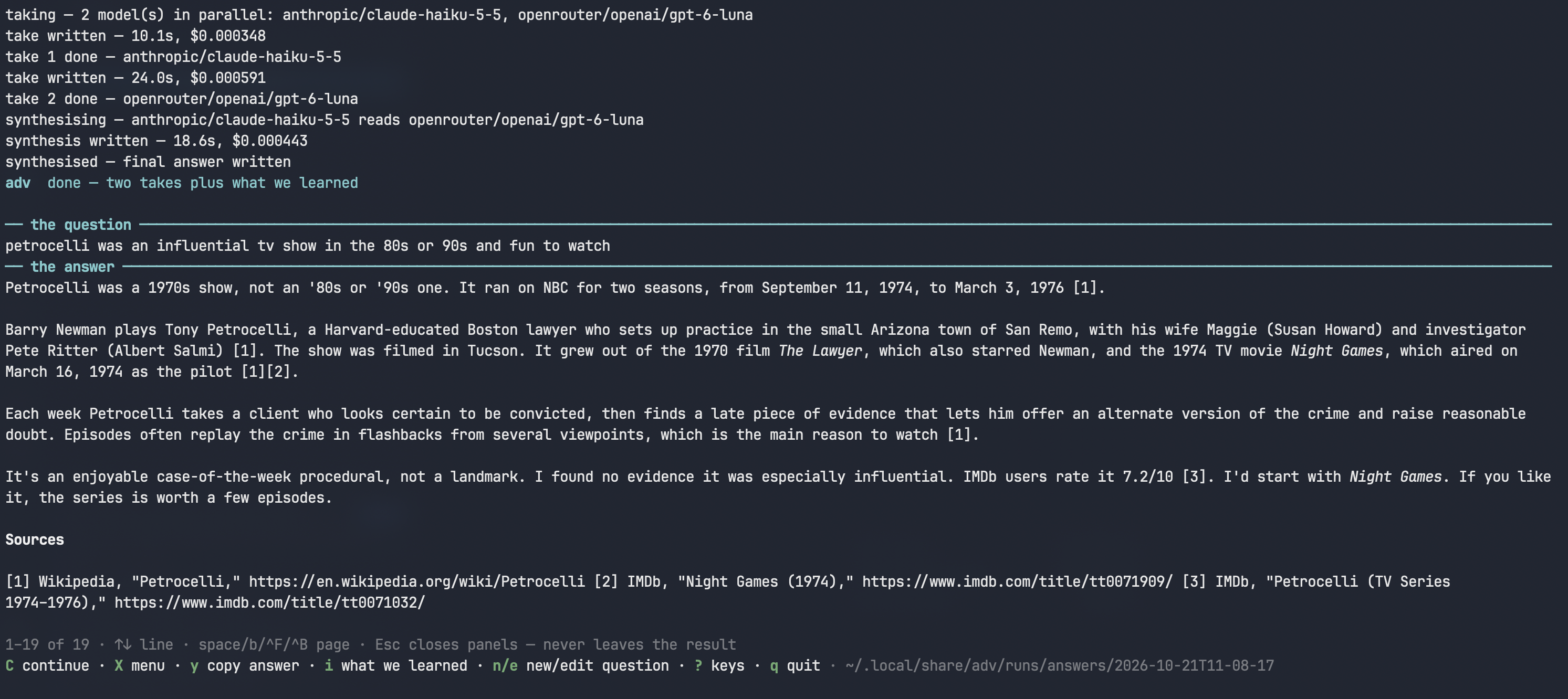
A finished debate: the question, the synthesised answer, and sources.
Better LLM results through AI debate
Churning an answer back and forth between two models is the wrong loop: it costs a lot of tokens, the models drift, and with no ground truth they just oscillate instead of converging. What works is narrower and cheaper:
- Independent takes stay honest. Each model answers the same prompt without seeing the others, so agreement is real signal and disagreement is worth reading — neither is an artefact of who spoke last.
- One synthesis, no churn. The lead keeps what was already right, takes what the peers did better, and recommends where they genuinely disagreed. A single pass, in parallel: wall-clock time is one take, not three.
- You settle the rest. The synthesis recommends; judgment calls stay with the human, who follows up where the models disagree.
adv — one question, several models, one answer
One command, and behind it:
- takes — two or three models answer the same prompt independently and in parallel, each read-only, none seeing the others;
- synthesis — the lead model reads every take and writes the final answer, keeping what was right, taking what the peers did better, and ending with a what we learned note naming each model by ref.
One pass. The x key shows the diff from take 1 to the final answer, so what the synthesis changed is visible.
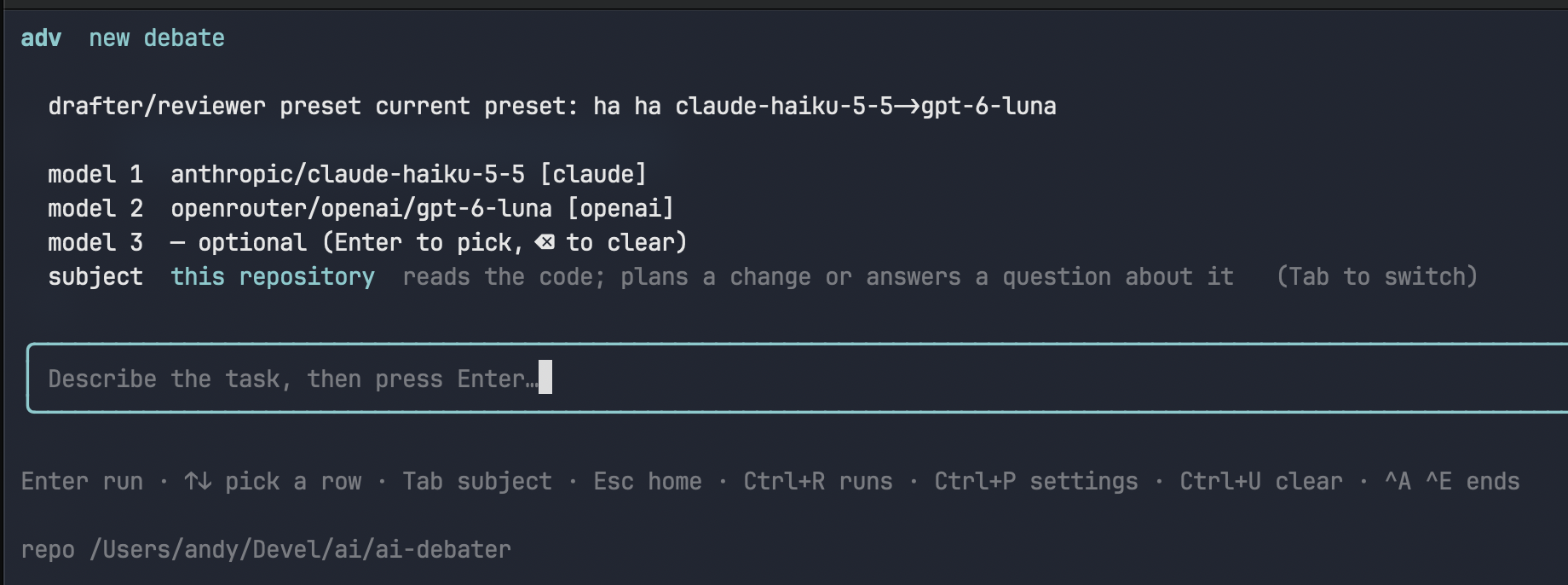
The new-debate desk: preset, models, subject, and the prompt.
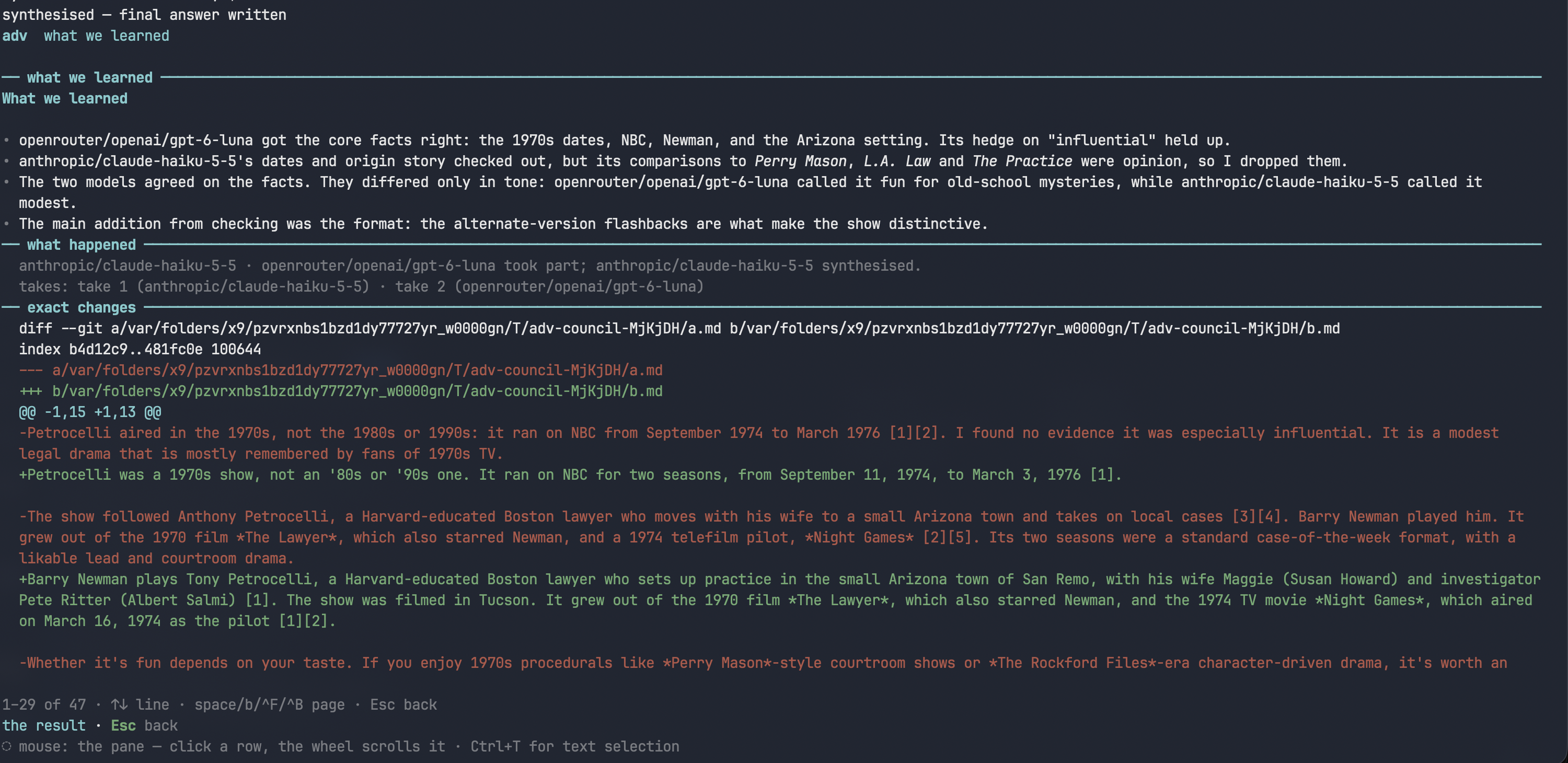
The i panel: what each take contributed, what happened, and the exact changes.
There are two front ends over the same pipeline: an interactive TUI (bare adv) and a scriptable CLI (adv <command>).
Use the tool for unfamiliar codebases, correctness-critical plans and high-stakes questions; skip it for small or familiar tasks, where the overhead exceeds the gain.
Bare adv opens the interactive TUI for the current directory. Home first — models browser, new debate, past runs, settings — then keys. Every screen lists its own keys behind ?; the essentials:
| Key | Action |
|---|---|
| ↑↓ · Enter | Choose a model pair or preset; on the prompt, run the typed task |
| Tab | Switch subject — this repository or a general question |
| y / Y | Copy the answer / the whole result as Markdown |
| x | Diff from take 1 to the final answer |
| i | What we learned |
| C | Continue this debate with a follow-up |
The scriptable side looks like this:
adv run "<task>" --dir <repo>          # plan or answer about a repository
adv run "<question>" --general         # general question, no repository read
adv continue --instructions "…"        # follow-up debate from a finished run
adv run "<task>" > plan.md             # answer as plain Markdown into a file
Useful flags: --dir <repo> to target another repository, --peer none for two models instead of three, --drafter / --reviewer / --peer (each with its --*-family) to override the saved models.
Non-goals. Not a multi-agent framework, not a replacement for tests, and not a code-writing tool — it produces plans and answers, and never edits the repository.
ocm — the model browser
ocm shows every model OpenCode knows, with live price, benchmarked intelligence, measured cost per task, and reachability — ranked so the best value is easy to spot. Ping a model (P) to settle whether your key can actually call it; results are cached and shown with their age. No run is started, no question is asked. The same browser is also inside adv — home first, then m.
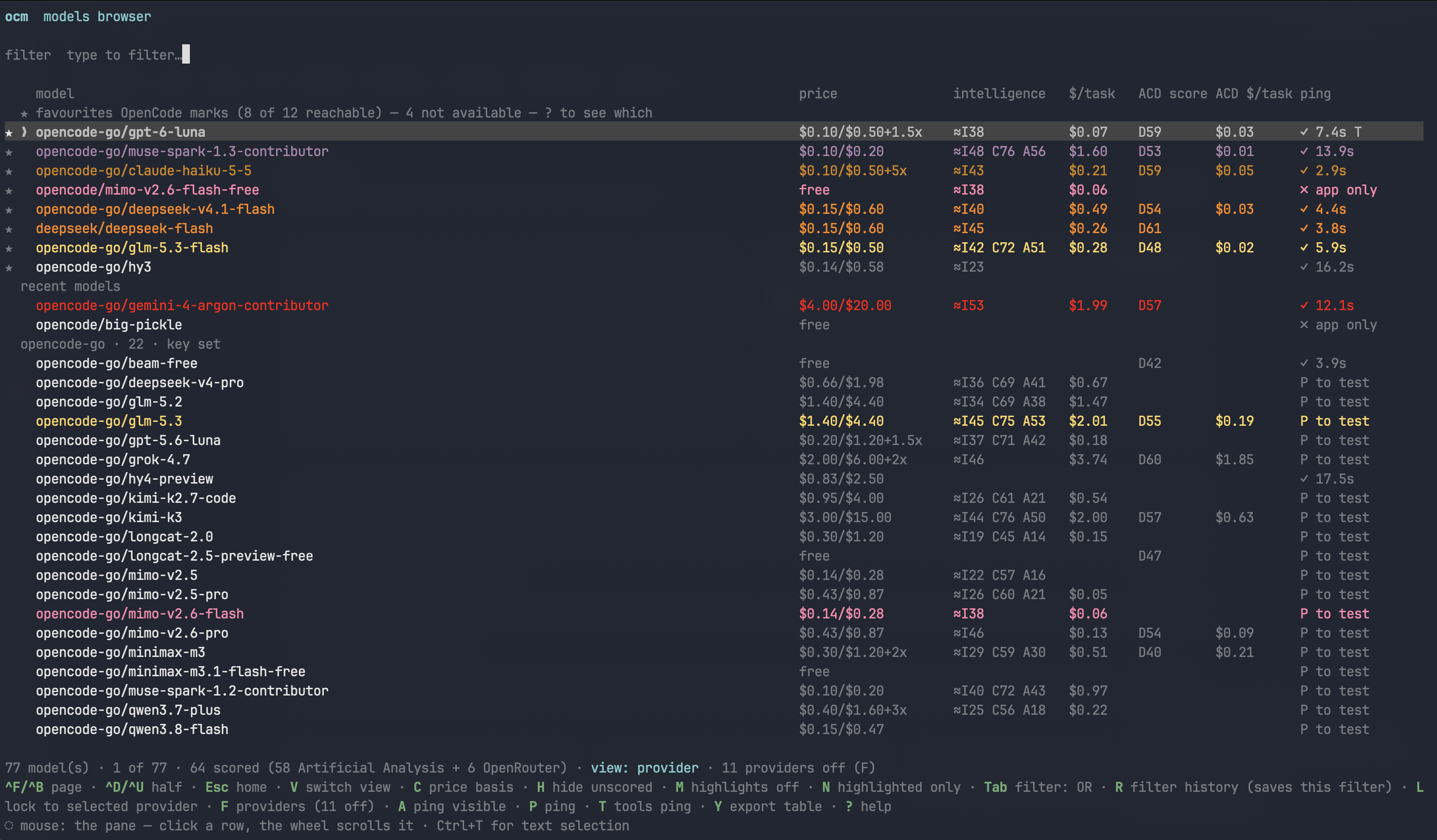
Provider view: favourites first, with price, benchmarks, measured cost and ping status.
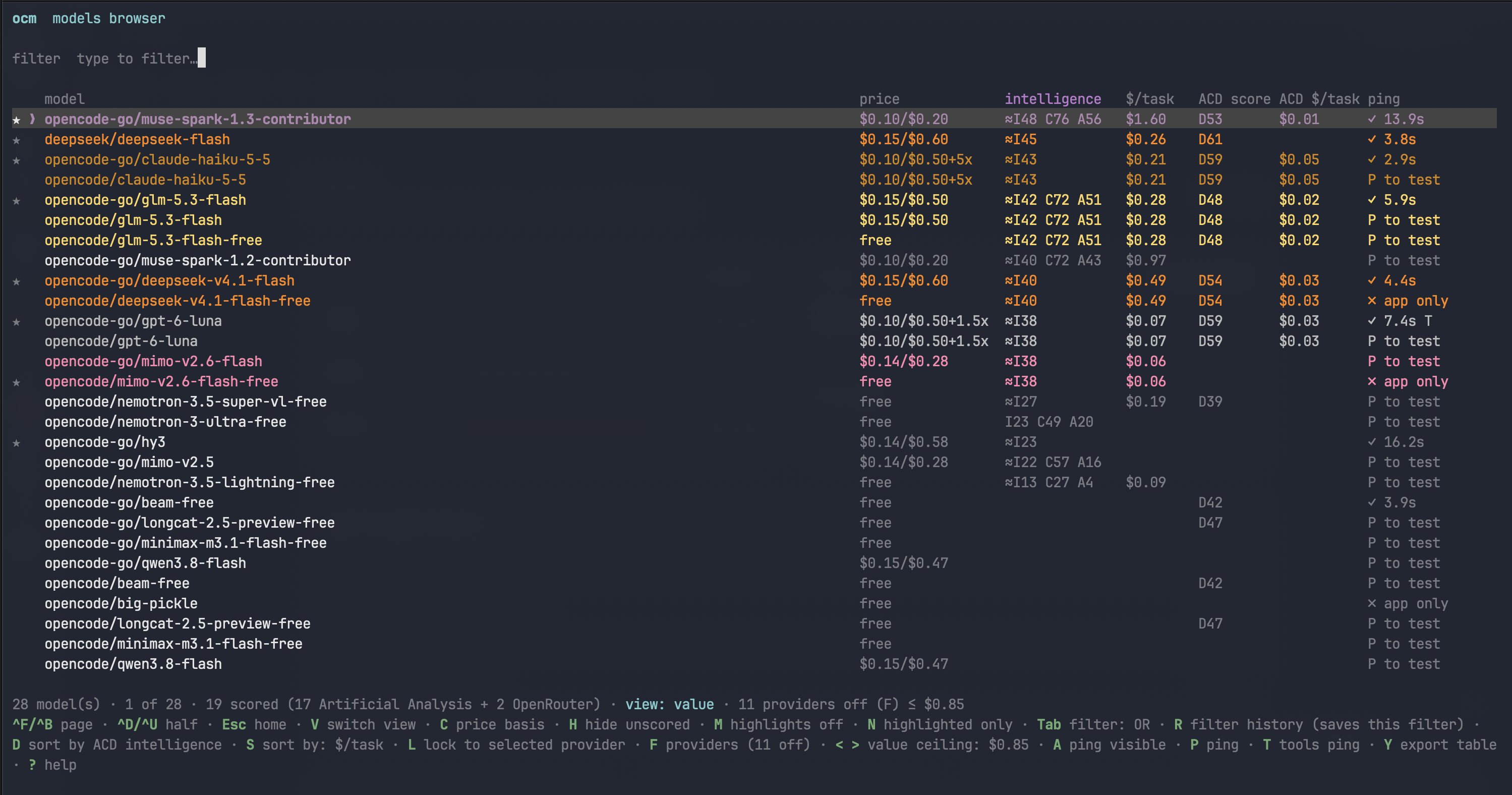
Value view: the same models ranked by measured cost, cheapest first.
Why the ping matters: opencode models lists every model in the catalogue for any provider you hold a key for, without asking the provider which ones the key can actually call — so it offers models that fail on first use. adv treats that listing as candidates, and P settles it with one real call (no credit, no access, blocked, throttled, app-only, or fine).
Installation
No npm account, no registry — install straight from GitHub:
curl -fsSL https://raw.githubusercontent.com/abulka/ai-debater/main/install.sh | sh
The script installs Bun if it is missing, warns if opencode is missing, clones (or updates) the repo into ~/.local/share/ai-debater, runs bun install, and symlinks adv and ocm into ~/.local/bin. Re-running it updates an existing install.
Or by hand:
git clone https://github.com/abulka/ai-debater.git
cd ai-debater
bun install
bun link                       # once: puts `adv` and `ocm` on PATH
Requirements: Bun (adv runs on Bun’s runtime, not plain Node) and OpenCode (every model call goes through opencode run).
How it works
A run moves through created -> taking -> synthesizing -> done, persisted per run under ~/.local/share/adv/runs/. Each run holds task.md, take.1.md, take.2.md (optional take.3.md), final.md, diff.patch, log.md, and state.json. Your models, subject and thresholds follow you between directories via the global ~/.config/adv/config.json — never anything written into a repository (except adv init, which creates .adv/criteria.md and .adv/decisions.md when you ask it to).
Full CLI reference, TUI keys, run storage, and the model browser are documented in docs/USAGE.md in the repo.
Technologies
| Description | Technology |
|---|---|
| Runtime | Bun (Bun.spawn, Bun.file) |
| TUI | Ink 8 + React 19 |
| Validation | Zod |
| Model backend | OpenCode CLI (opencode run) — no API keys in the tool itself |
Code: github.com/abulka/ai-debater · MIT