BAR AutoHotkey
BAR AutoHotkey Cheat GUI
An AutoHotkey v2 script that automates the in-game
console commands (“cheats”) for Beyond All Reason
(BAR) via a popup GUI.
Instead of typing /give 10 armck 0 by hand, you press a hotkey, pick a unit
from a searchable tree, and the script types the Enter → cheat → Enter sequence for you.
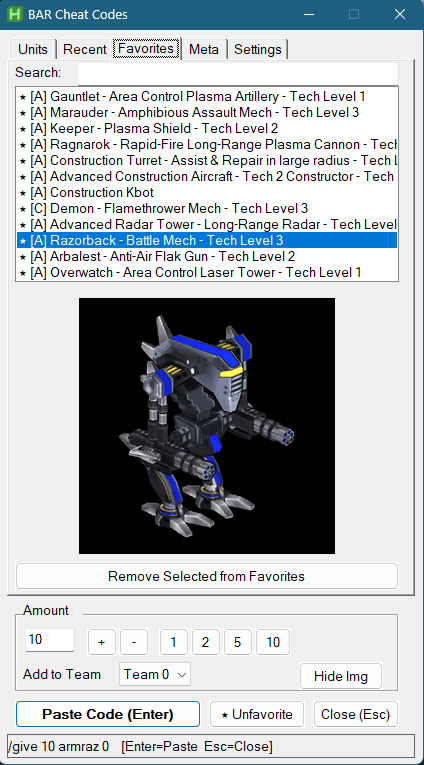
It’s a convenience tool for experimenting with the game: spawn units, buildings and weapons, or toggle commands like god mode and no-cost, without memorising the codes.
Caveat: cheats only work once the host has enabled cheat mode with
/cheat, so this is for your own skirmish sandbox games — not for online matches against others. Units are spawned at the position of your last mouse click.
Features
- Searchable unit tree with image preview — units, buildings, weapons and aircraft, grouped and filtered as you type (e.g. “big berth”).
- Armada / Cortex factions — the tree switches faction and remembers each one’s expand and selection state separately.
- Recent and Favourites tabs — every pasted cheat is recorded (deduplicated by unit
code, tagged
[A]/[C]), and units can be starred with the ★ Favorite button. - Meta tab — game commands such as
/cheat,/godmode,/nocost,/globallosand infinite resources. - Shared Search and Amount/Team controls — set an amount like 7 and a team slot, and
it pastes e.g.
/give 7 <unit> <team>. Both are shared across the tabs. - Configurable hotkey (default
Alt+C), dark mode, always on top, and remembered window position. - State memory — last tab, last item, tree expand state and scroll position are all restored when you reopen the window.
- Game detection — pasting only happens when the BAR window is detected, otherwise a tray notification is shown and nothing is typed.
How it works
With BAR running, press the hotkey to open the cheat GUI. On the Meta tab, double-click
Cheat ON to run /cheat and enable cheat mode. Then pick a unit on the Units,
Recent or Favourites tab and press Enter (or click “Paste Code”). The script
opens the console, types the code and submits it. Press Escape to close the GUI without
pasting.
Requirements and platforms
- Windows — AutoHotkey v2.0 installed. Double-click
bar_cheat.ahkto run it. - Linux — the same script runs unmodified on the
AutoHotkey v2 Linux port, using its X11
backend for the global hotkey and a
/dev/uinputvirtual keyboard to type the code. There are native Debian/Ubuntu instructions, a tarball install, and a distrobox recipe for immutable distros such as Fedora Silverblue. - WSL2 — supported for previewing the GUI only; it has no usable input backend for a real game.
Full setup, troubleshooting and the Linux internals are documented in the repo’s README and
docs/linux-port-internals.md.
Refreshing unit data
Unit names, descriptions and preview images are scraped from beyondallreason.info with a small Python script:
uv run python bar_web_scraper.py --check --faction all                 # dry run: list changes
uv run python bar_web_scraper.py --faction all --merge bar_cheats.txt  # refresh data + images
Technologies
| Description | Technology |
|---|---|
| GUI and automation | AutoHotkey v2 (Windows and the Linux port) |
| Unit data scraping | Python (bar_web_scraper.py, run with uv) |
| Linux input | X11 backend + /dev/uinput virtual keyboard |
Code: github.com/abulka/AutoHotkey · MIT