Bar Chess
Bar Chess — chess with bullets
Bar Chess is chess with bullets — a chess-derived battlefield where pieces move by chess geometry and shoot visible projectiles at each other, inspired by BAR (Beyond All Reason), the open-source RTS game.
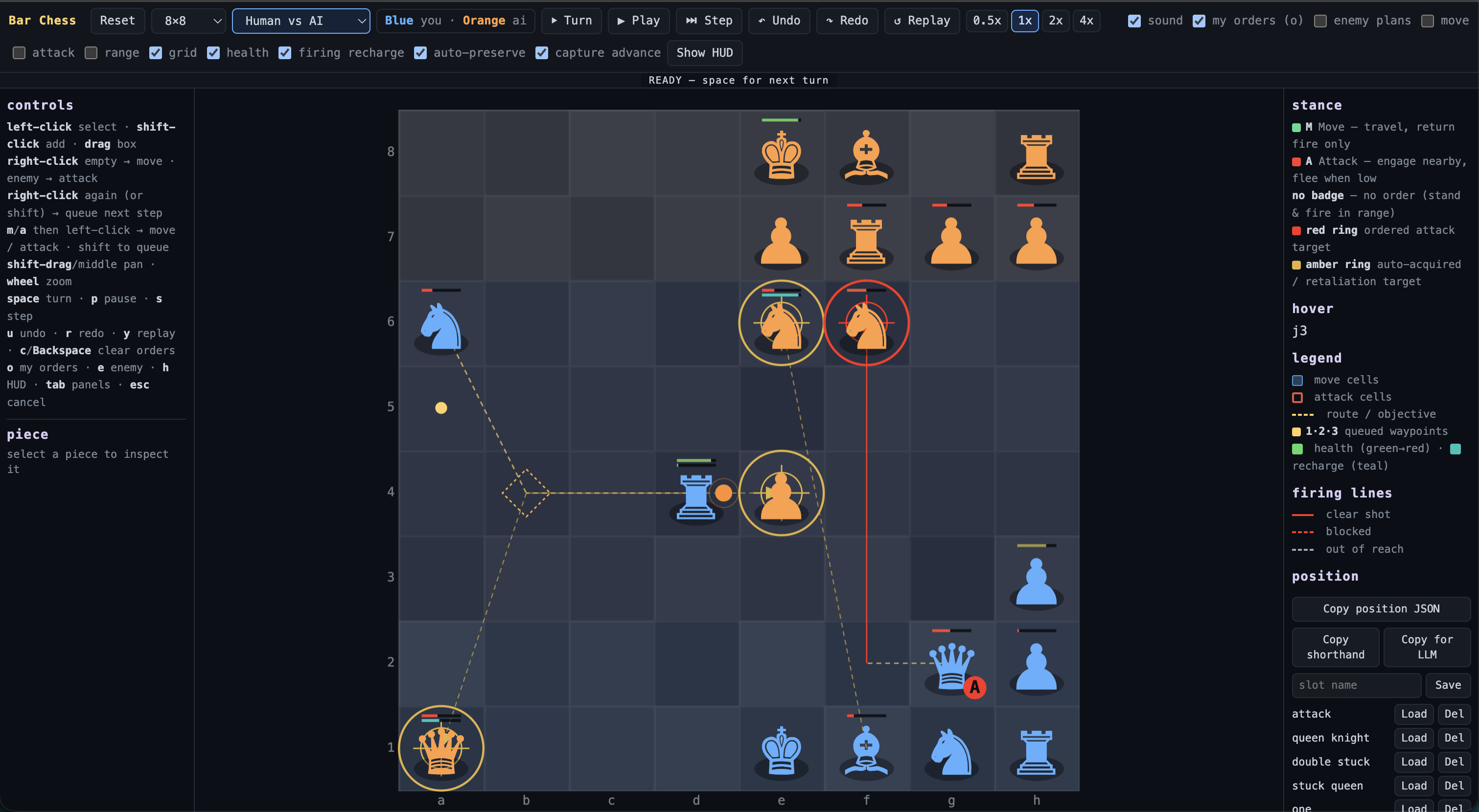
You command your pieces by giving them intentions (a destination or a target), then watch autonomous movement, firing, projectile flight and destruction play out. It is not chess: there are no turns, check or checkmate — chess only supplies the movement language, the piece identities and the firing geometry.
Demo
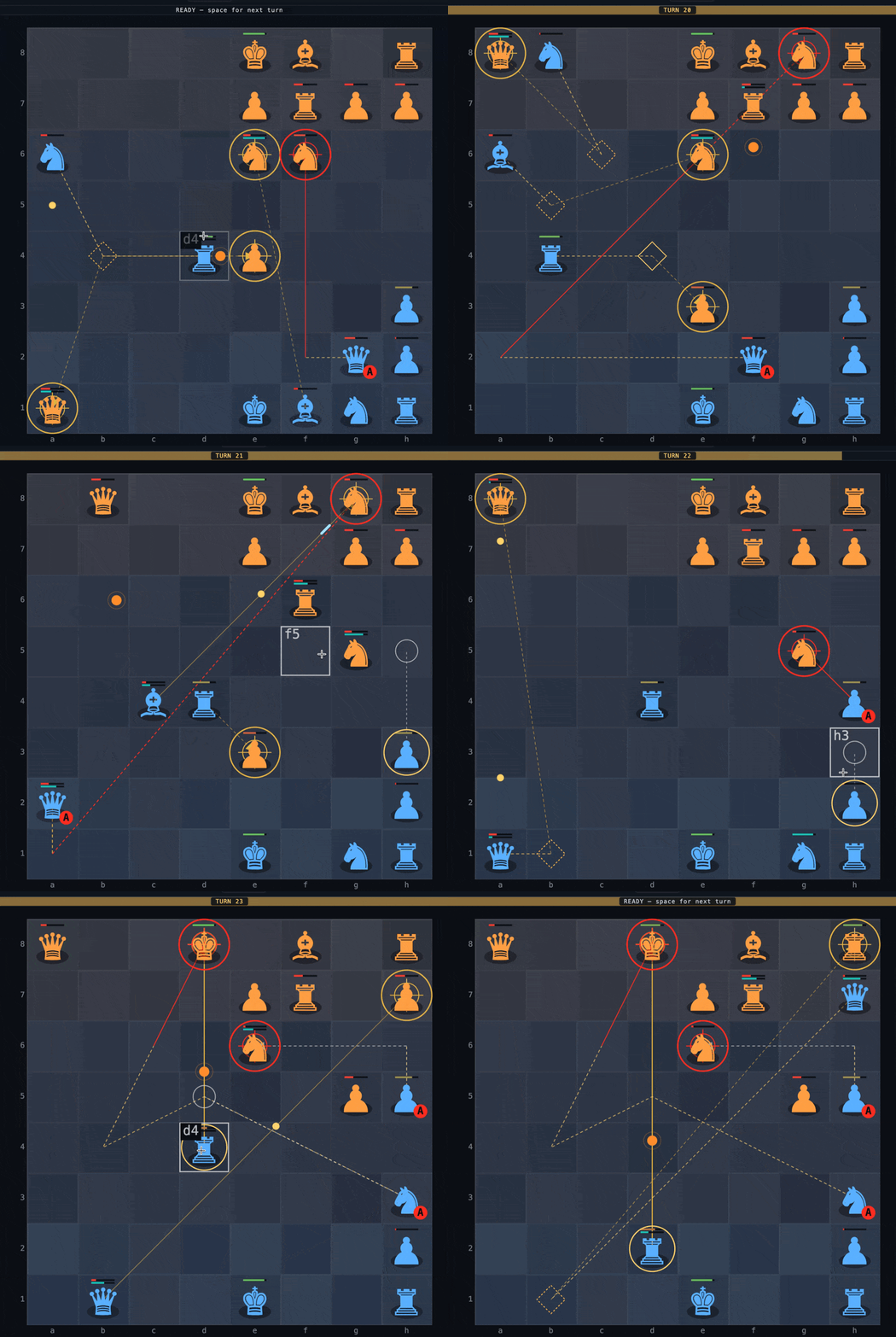
BAR is great — so what if we applied it to chess?
BAR (Beyond All Reason) is one of the best real-time strategy games around. Its genius is that commanding feels effortless: you right-click to order a move or an attack, set a persistent stance, and your units get on with it — fighting opportunistically, returning fire and looking after themselves. You command by intent, not by micromanagement, and pause and game speed are first-class strategy tools rather than afterthoughts.
Bar Chess asks the obvious question: what happens if you take those keystrokes and that RTS genre and point them at chess? The answer is a game that keeps chess’s readable movement geometry but gives it real-time combat. Each piece fires visible, travelling projectiles that can miss, be blocked or arrive late. Health and firing-recharge bars, target rings and order queues make the battlefield legible. Chess’s turn-based certainty is replaced by the messier, more tactical RTS world of shots in flight and fights you have to actually watch.
Pieces move multiple moves at once — and the AI matches your pace
The most interesting idea is that pieces aren’t limited to one move per turn. You can move a single piece a single square if you like — and the AI will reply at exactly that one-move pace. Or you can order several moves and actions in one go, and the AI matches the number of moves you make. If you want to play loosely and one step at a time, that’s the pace; if you want to move several moves at once, the AI will match that pace too. Real-time control, with pause available as a genuine strategic tool, turns this into a game about tempo and commitment rather than just material.
Features
- Chess movement, RTS combat. Rooks slide along ranks and files, bishops along diagonals, knights leap, pawns advance and fire their forward diagonals. Every piece fires visible, travelling projectiles that can miss, be blocked or arrive late.
- Command, don’t micromanage. Right-click to set goals; pieces work toward them and fight opportunistically. Set a persistent stance (Move / Attack / None) and let them engage.
- Real-time with pause as a strategy tool. The battle starts paused. Issue orders, take a turn, or let it run at 0.5×/1×/2×/4× speed.
- Turns, undo, redo and deterministic replay.
spaceadvances one turn (one move per piece, then auto-pause);u/rstep through turn history;yreplays the last turn exactly. - Readable overlays. Move cells, attack cells, range arcs, paths, firing lines, health and firing-recharge bars, target rings and per-army order summaries.
- Game modes. Human vs AI, AI vs AI and Human vs Human.
- Procedural audio. WebAudio SFX driven by an event bus, with a synth editor to tweak every cue.
- Self-preservation, bodyguards and capture-advance make fights feel tactical rather than static.
How to play
The battle starts paused. Your team is blue (vs orange AI by default).
- Left-click a piece to select it; shift-click to add to the selection; drag to box-select.
- Right-click an empty square to order a move there. Right-click an enemy to order an attack (sticky target, shown with a red ring).
m/athen left-click forces a move / attack command; hold Shift to queue several.- Set a piece’s persistent stance from the left panel:
MMove,AAttack, or none (stand and fire in range only). - Press
spaceto take a turn,pto pause/resume,sto step one tick. - Shift-drag or middle-drag to pan, wheel to zoom. Toggle overlays in the toolbar.
Keyboard summary: m/a arm move/attack · space turn · p pause · s step · u/r
undo/redo · y replay · c/Backspace clear orders · o my orders · e enemy plans · h
HUD · Esc cancel.
Tech stack
- Frontend: Vue 3, TypeScript, Vite.
- Audio: procedural WebAudio SFX driven by an event bus.
Play it at bar-chess.netlify.app.
Code: github.com/abulka/bar-chess · MIT
See also
- BAR AutoHotkey — a desktop tool that automates BAR’s in-game cheat console.