Command Line Tools
Command Line Tools
A collection of small, focused command-line utilities I have built over the years. They live in
one monorepo-style folder (~/Devel/cli-projects/), are mostly MIT-licensed, and are written
in either Go (single static binary) or Python (run with uv). Most are build-from-source;
lspath is the exception with full packaged releases.
lspath — analyze, debug, and optimize your PATH
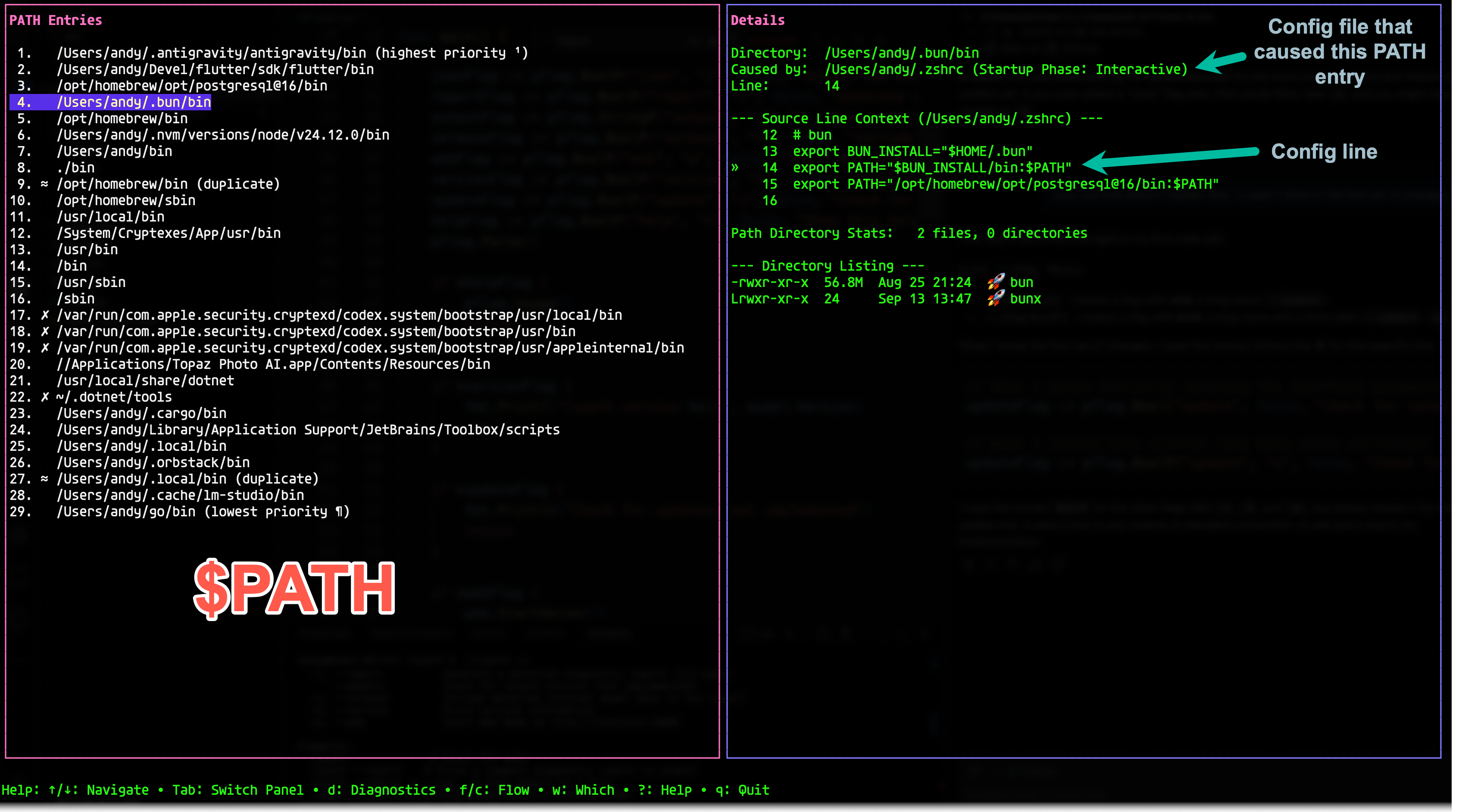
The flagship tool of the collection. lspath visualizes how your PATH is constructed by your
shell’s startup sequence (.zshrc, .zprofile, etc.) and identifies common problems like
duplicates and missing directories.
- TUI mode (default) — an interactive terminal interface built with Bubble Tea:
- Flow mode — visualize the “evolution” of your PATH as shell startup files execute.
- Diagnostics — instantly spot broken links, missing directories, and duplicate entries.
- Which mode — find where commands live and identify “shadowed” binaries.
- File preview — inspect the exact lines in your config files that modify the PATH.
- Web mode (
--web) — a local web dashboard for exploring your PATH in a browser. - CLI mode —
--reportfor human-readable diagnostic reports,--jsonfor raw data.
It ships as packaged releases for Ubuntu/Debian (.deb), Fedora/RHEL (.rpm), macOS
(downloadable binary), and Windows (.zip), and can self-update with lspath --update.
Code: github.com/abulka/lspath
cli — command-parameter helper
cli takes any Linux or Mac command and runs it — but first it lists all possible arguments
to the command and lets you select which ones you want to use. It is a lifesaver for commands
with many options, or ones you don’t use often and can’t remember the flags for. Press ? for a
deeper summary of a parameter, which is dynamically extracted from the command’s --help output
or man page, so it is always accurate and up to date — and it works with any command.
cli ls
# lists every ls option, lets you pick, then runs: ls -lh
Code: github.com/abulka/cli
dumpdir — dump a project into an AI prompt
dumpdir dumps the contents of a directory to a Markdown file, skipping files and
directories ignored by .gitignore (and respecting the GIT_DIR environment variable). It is
built precisely for the workflow of pasting a programming project’s source into an AI prompt,
keeping the output tidy and context-rich. Cross-compiles to Linux ARM and Windows for quick
deploys to other machines.
Code: github.com/abulka/dumpdir · Companion web UI: dumpdir-react-app, a React front-end for browsing and pasting directory dumps
cpu-top — find CPU hogs
Displays processes consuming CPU above a threshold percentage in a top-like format, with a
history of CPU usage so you can monitor trends over time. Comes in three flavors: a
Python rich version (colour, history — the recommended one), a Python simple version
(no history, no colour), and a Go version. The default threshold is 20% and is adjustable.
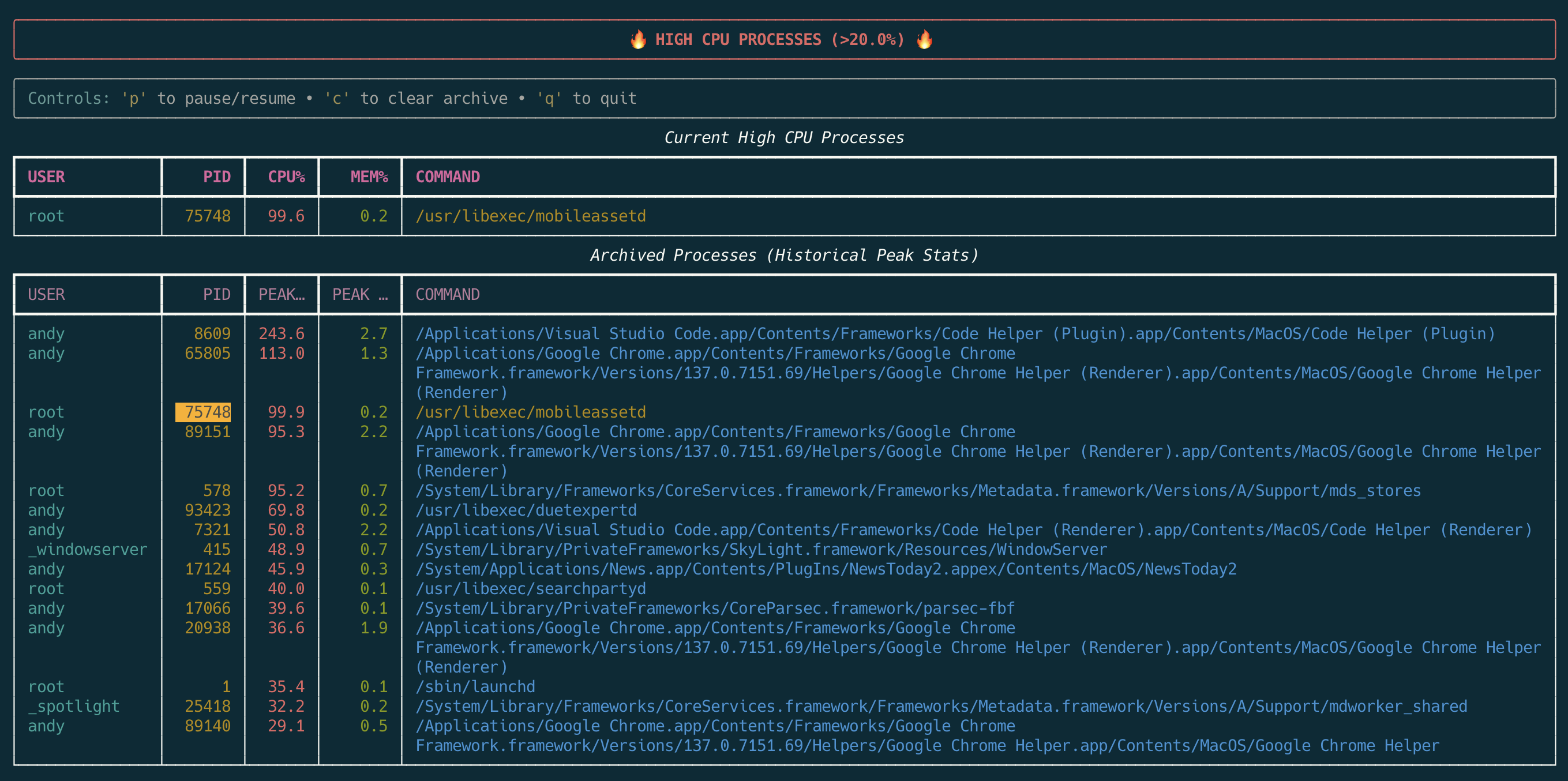
uv run cpu-top-rich.py --threshold 50
Code: github.com/abulka/cpu-top
ping-master — network health check
A simple Python script that pings a list of hosts and checks web applications are responding,
driven by a plain-text config file. Each host entry can have a primary and an alternate
hostname/IP, and a Type of ping or web (HTTP HEAD check). It produces a tidy summary of
everything up and down — great for keeping an eye on a home server fleet (Proxmox VMs, a Synology
NAS, Raspberry Pi, etc.).
Part of the local cli-projects collection (not yet published).
Status & future
All of these are MIT-licensed and build-from-source (Go: go build; Python: uv run).
lspath already publishes packaged releases across platforms; producing GitHub Releases for the
others is a TODO for the future, along with prebuilt binaries so they are a one-command install.