Muse
Muse — Dynamic Prompt Generation for AI Image Apps
Muse is a toolkit for systematically varying AI image-generation prompts. The core idea is
a dynamic-prompt engine: instead of typing one prompt, you write a template containing
{category} tokens, and Muse fills each token with a random pick from a large curated pool —
so the same template can produce thousands of distinct results. It plugs into two worlds: the
Draw Things app on Apple Silicon (as a script) and ComfyUI workflows (local or cloud).
muse.js — the Draw Things script
Run from Draw Things’ script panel. A dialog presents all the controls; hit Start and it generates a batch of images, each with a freshly composed prompt.
- Clothing mode — Clothed / Mixed / Nude, with a nudity % slider active in Mixed mode.
- Generation mode —
- Random — each image picks a random template, then random tokens (maximum variety);
- Cycle — steps through the templates in order, random tokens each time;
- Iterate — picks one template and exhausts every possible token combination for it.
- Seed mode — Random, Increment (reproducible sequence), or Static (reuse the current Draw Things seed).
- Batch count — 1 to 2000 images (in Iterate mode it runs until all combinations are exhausted).
- Output directory — optionally save each image with a filename encoding the model, sampler, steps, timestamp, and batch index.
How templates work
Each template in the prompts array contains {tokens}:
"{solo_subject}, {clothing}, {solo_pose}, in {interior_locale}, {interior_props}, {camera}, {gaze}, highly detailed, {artStyle}, ..."
Before each image is generated, every {token} is replaced with a random item from the matching
category array. The token syntax supports ranges too: {category} picks one item,
{category:2} exactly two, and {category:1-3} anywhere from one to three.
The built-in category pools are large and hand-curated — 83 locales, 55 poses, 50 interior props, 39 clothing items, 35 gaze variants, 13 art styles and more — and the shipped templates include ten named setups (Fantasy Interior, Outdoor Forest, Sci-fi Dome, Goddess · Seated, Bosch Lounge, Forest Colorful, Sci-fi Pool, Emerging from Water, Psychedelic Garden, and more).
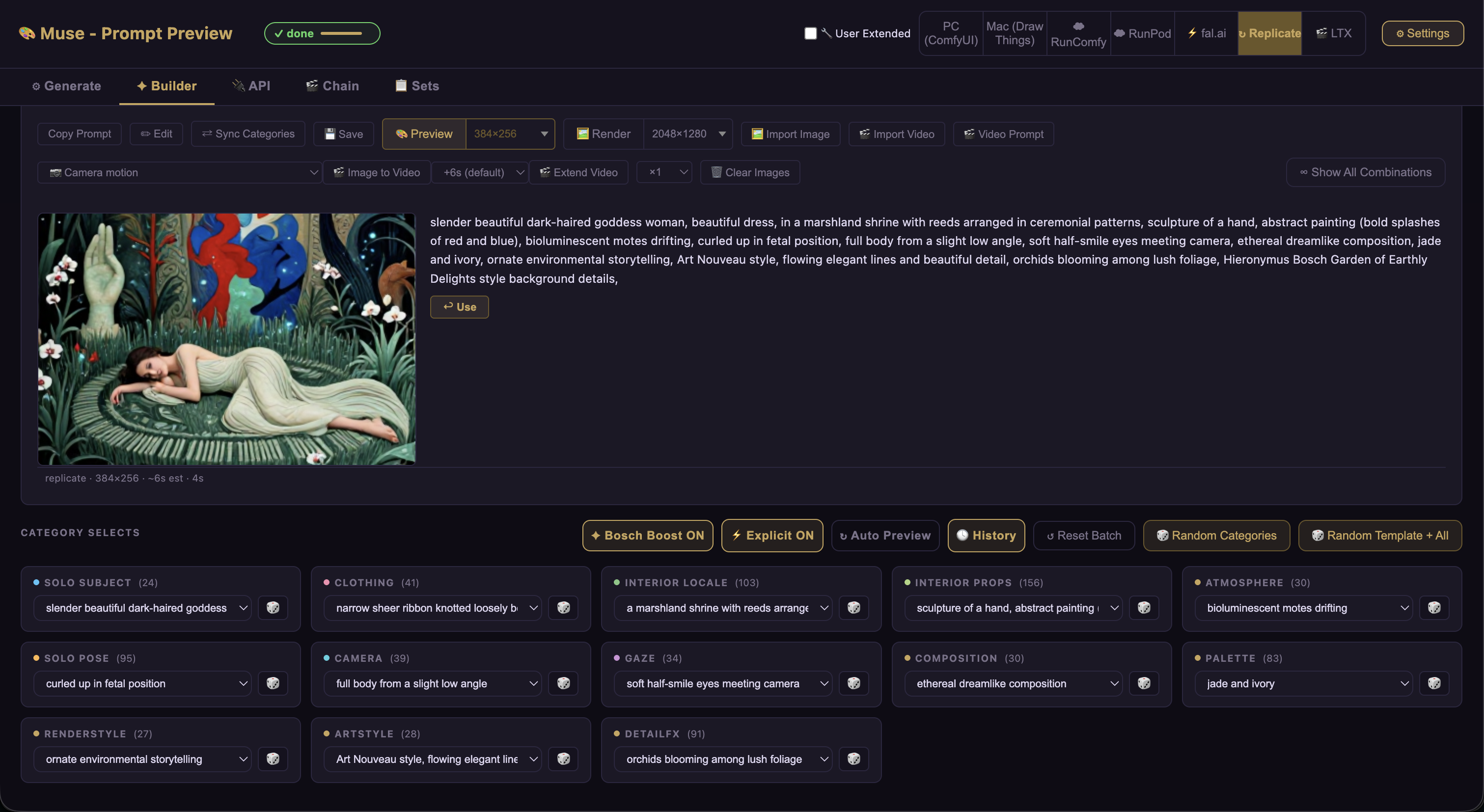
muse-gui.html — preview the prompts in a browser
A standalone HTML file that mirrors the script’s controls, so you can preview and copy resolved prompts without running Draw Things. It reads its data from an embedded JSON block that is kept in sync with the source of truth by a tiny CLI:
edit muse.js → node sync-gui.js → refresh browser
ComfyUI workflows
Muse also drives image generation through ComfyUI. The z-image turbo workflow is the workhorse: about 32 s for 2048×1280 locally, and the same workflow deploys to cloud GPU runners (RunComfy, A4000, ~$1.75/hour) with roughly the same timings (~20–32 s per image). A detailed cost analysis is included — a 5-minute cold start costs ~15 cents and each 32-second image ~1.5 cents.
CLI tools
Muse ships as npm-installable command-line tools:
muse-serve— serve the GUI (or the test preview server) over the network.muse-sync-gui— regenerate the GUI’s embedded JSON frommuse.jsafter editing.muse-batch— a ComfyUI batch queue runner for generating many images without the GUI.
Tech stack
A plain-JavaScript engine (muse.js) with no framework dependencies for the core, a
self-contained HTML GUI, and Node scripts for serving, syncing, and batching. Everything is
local-first — the Draw Things and ComfyUI backends run on your own hardware (or a cloud GPU you
rent by the hour).
Status
Build-and-run-yourself at the moment — no hosted build or prebuilt releases yet. Producing GitHub Releases for the CLI tools is on the TODO list for the future.
Code: github.com/abulka/muse (private for now)