Suno Generator
Suno Generator
Suno Generator is a Chrome extension that batch-generates Suno Cover Song variations from saved style presets, applying your naming and workspace conventions. It works by driving the real suno.com UI — there is no public Suno API and Workspaces are UI-only.
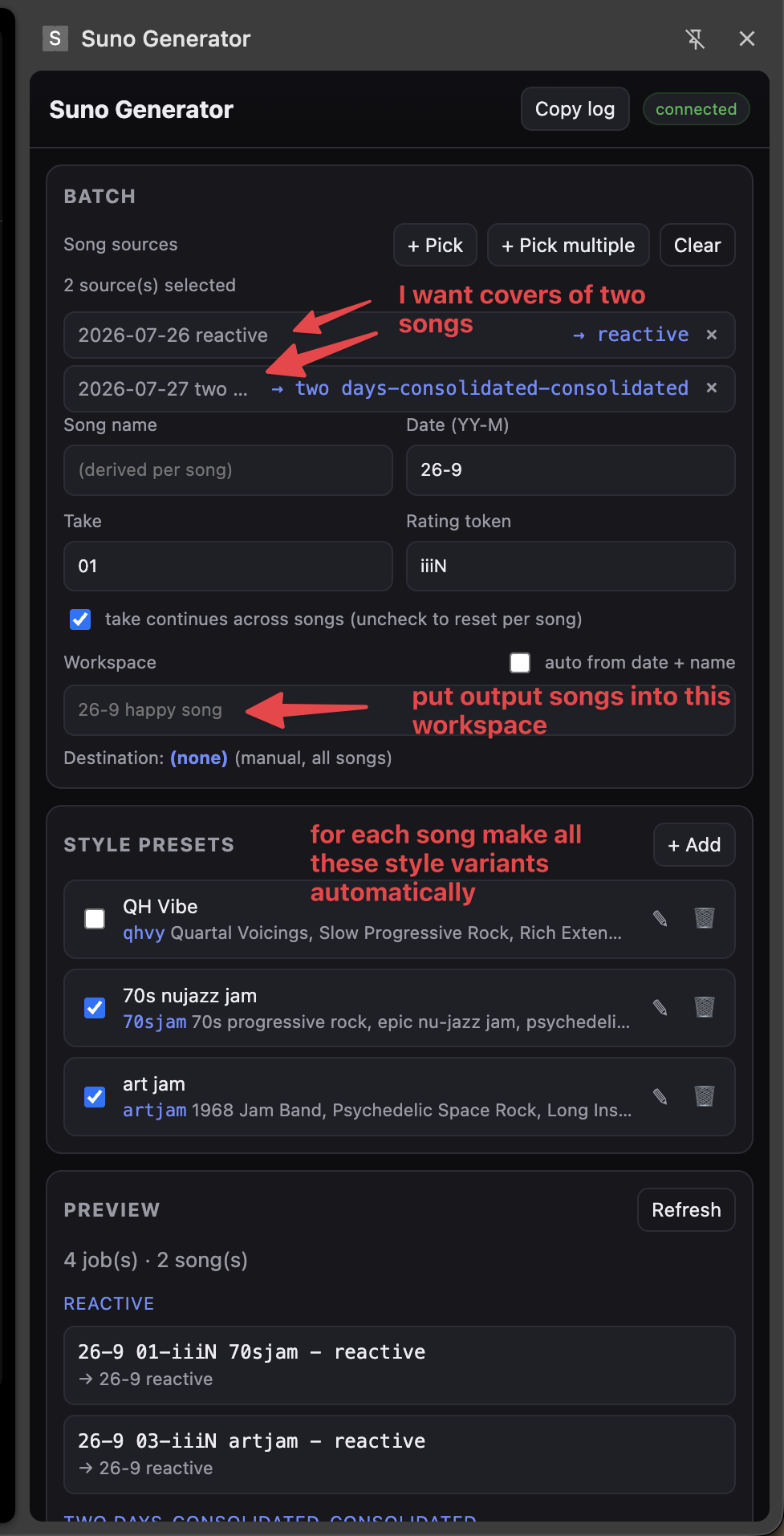
Give it one or more source songs and a set of presets; it walks Suno’s own cover flow for each preset (set the cover source, Advanced mode, style, title, lyrics, workspace) and submits the batch, then monitors each job to completion.
Two headline features
Batch cover generation
Pick one or several source songs and tick the style presets you want, then click once — there’s no need to manually walk Suno’s cover flow and change the style over and over. The extension expands sources × presets into jobs and submits them all, naming each resulting song with the style code so you can tell at a glance which songs were generated with which style:
- Title template:
{date} {take}-{rating} {styleCode} - {songName}date=YY-M(e.g.26-9);take= 2-digit and steps by 2 per style;ratingdefaults to the literaliiiN(a searchable placeholder you edit later);styleCode= no spaces, ≤ 8 chars.- Example:
26-9 01-iiiN qhvy - happy song
- Workspace: defaults to
{date} {songName}(e.g.26-9 bird song), or a per-preset override. Missing workspaces are auto-created.
Each style preset holds a style prompt, a short style code, optional lyrics and an optional workspace override. A “take” counter steps by 2 per job because Suno always makes 2 clips per Create.
Download management
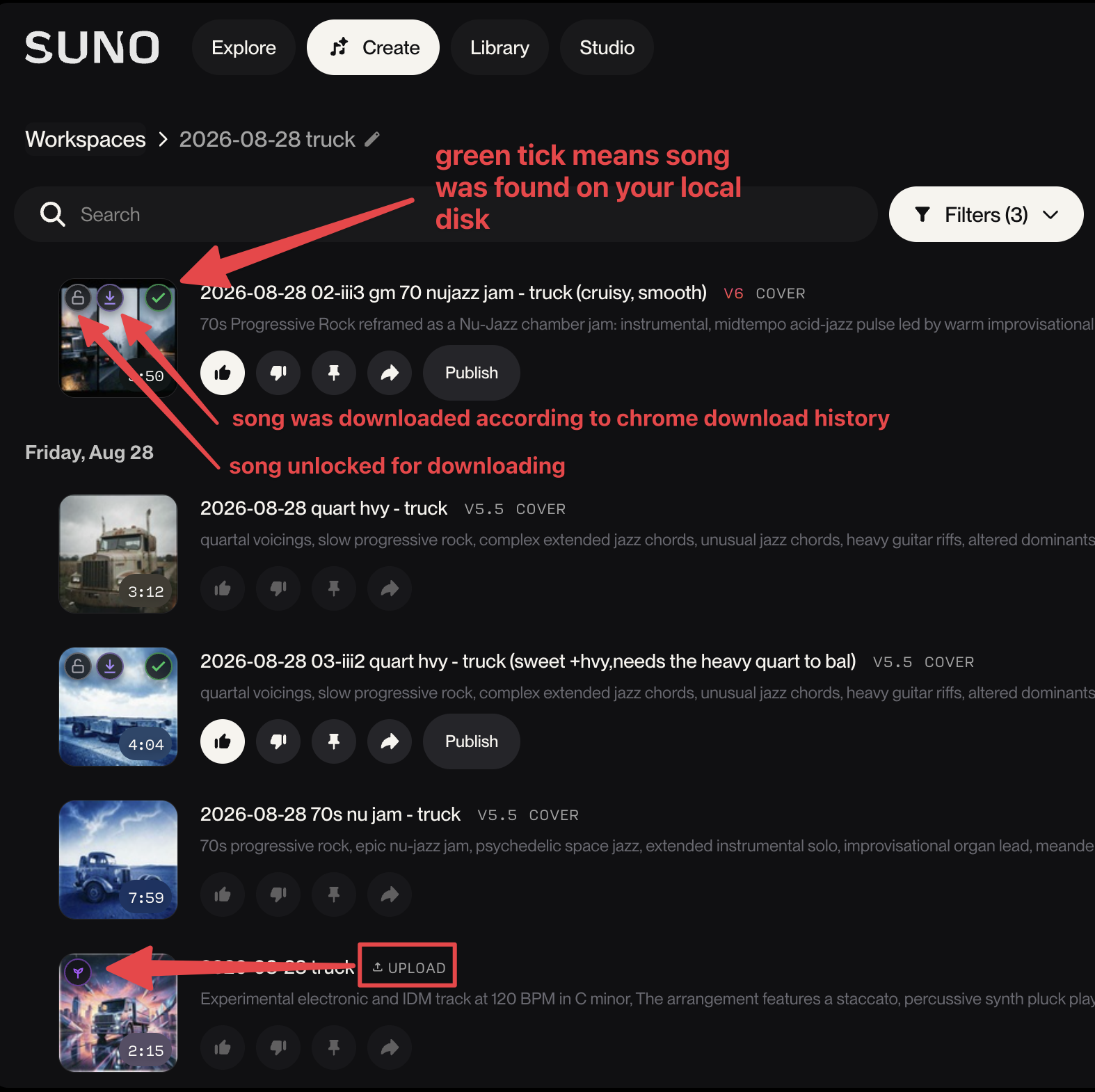
Point the extension at a local folder where you keep your Suno downloads and an icon appears in the Suno UI itself, over any songs that have been downloaded to your disk — so you can keep track of which songs you already have. It works out not only which Suno songs have been unlocked for download, but also which of those songs have been found on your local disk, matched against the online Suno song UUIDs embedded in the downloaded audio files.
Download badges
Suno Generator injects small badges onto each clip’s artwork in the Suno clip list, each showing an independent fact about the clip. They are overlaid directly in the Suno UI, so you can see at a glance which songs you already have without leaving the page.
| Icon | Meaning |
|---|---|
| Grey open padlock | Unlocked on Suno — re-download is free |
| Purple sprout | An unlocked clip that is your own upload |
| Violet down-arrow | A download was seen in Chrome download history |
| Green tick (top-right) | A file is on disk (found by the folder scan) |
Each badge has its own checkbox under Tools → Download sync, so you can turn individual indicators on or off. The on-disk badge’s tooltip shows the matched file path.
The folder scan is what powers the green tick. It matches files to clips by the
clip id embedded in the audio metadata (M4A ©cmt, WAV ICMT, and the C2PA
com.suno.provenance / icontentIdx block). It is authoritative for “on
disk” (a rescan drops facts for files that are gone), incremental (caching
{size, mtime, id} per file in IndexedDB so unchanged files are skipped), and
refreshes automatically when the panel opens and shortly after a download
completes — as long as folder permission is still granted. Audio streams are
encrypted and not readable; only files you have saved are inspected.
More features
- Multiple sources — pick one or several source songs; names are derived per source and de-duplicated.
- Style presets — each with a style prompt, a short style code, optional lyrics, and an optional workspace override.
- Naming conventions — automatic titles and workspace names (see above).
- Batch engine — expands sources × presets into jobs, fills the create form, selects/creates and verifies the workspace, and submits.
- Status monitoring — watches each job through
queued → streaming → complete, deduped across the DOM poll and a network hook. - Folder scan — optionally point it at your downloads folder to mark which clips are on disk, matched by the clip id embedded in the audio file.
Installation (load unpacked)
The extension is not published to the Chrome Web Store (yet) — it’s a developer tool that you load unpacked yourself:
- Get the code:
git clone https://github.com/abulka/suno-gen.git suno-gen - Open
chrome://extensionsin Chrome. - Enable Developer mode (top right).
- Click Load unpacked and select the
suno-gen/folder (the one containingmanifest.json). - Pin the extension, then click its toolbar icon to open the side panel.
On macOS you need desktop Google Chrome 114+ (for side-panel support).
Usage
- Open a Suno page that shows your clip list (e.g. the Library).
- In the panel, click Pick (one source) or Pick multiple and click song rows.
- Fill the Batch fields: date, take, rating token, and (optionally) a song name and workspace.
- Tick the style presets you want.
- Tick dry run first to preview jobs without submitting.
- Click Generate batch.
Status & disclaimer
This is an unofficial, personal-use tool. It is not affiliated with, endorsed by, or supported by Suno. It automates the suno.com web UI, which may violate Suno’s Terms of Service and can break whenever Suno ships UI changes. Use it at your own risk.
- It is a developer tool: loaded unpacked, not published to the Chrome Web Store, and with no automated test suite. Selectors are verified against live Suno but can drift.
- Generating songs (and downloading them) spends credits / plan allowances.
Technologies
| Description | Technology |
|---|---|
| Extension platform | Chrome Manifest V3 (sidePanel, service worker, content scripts, MAIN-world page hook) |
| UI | Side panel, vanilla HTML/CSS/JavaScript |
| Local folder access | File System Access API (indexed in IndexedDB) |
| Local dev harness | Node 24+ / Playwright (tools/, dev only) |
Code: github.com/abulka/suno-gen · MIT © 2026 Andy Bulka